The nursing faculty simulation dashboard that shows who needs you.

Assign AI patient cases, track completion and review rubric-scored performance without sitting in every session.

One view of every student in the simulation cohort.

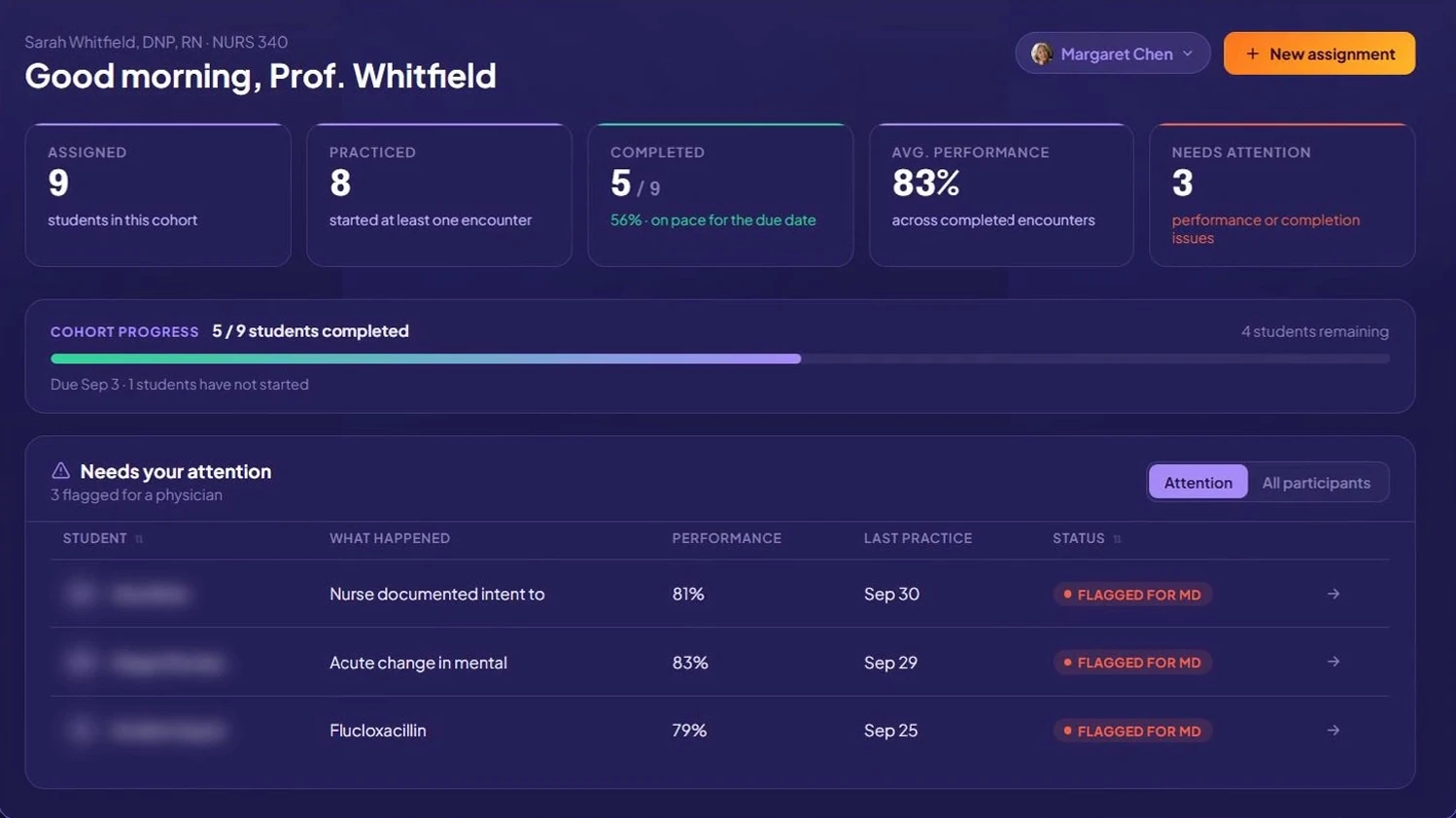
The overview opens on five numbers: assigned, practiced, completed, average performance and needs attention. Everything else is one click deeper.

Faculty dashboard cohort overview showing assigned, practiced, completed, average performance and needs attention counts
Cohort overview
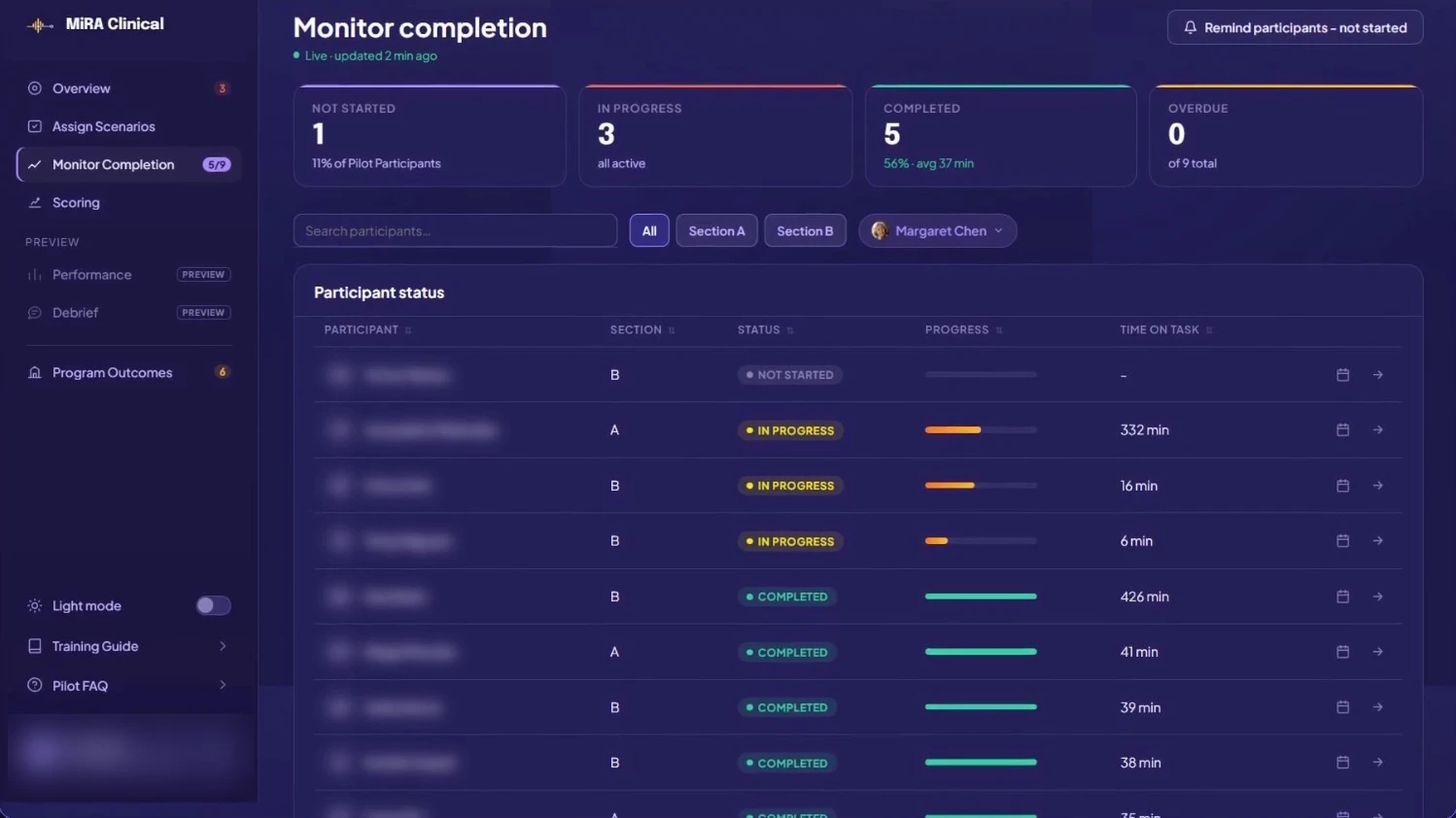
Faculty dashboard Monitor completion view with live status, progress and time on task for each student
Monitor completion
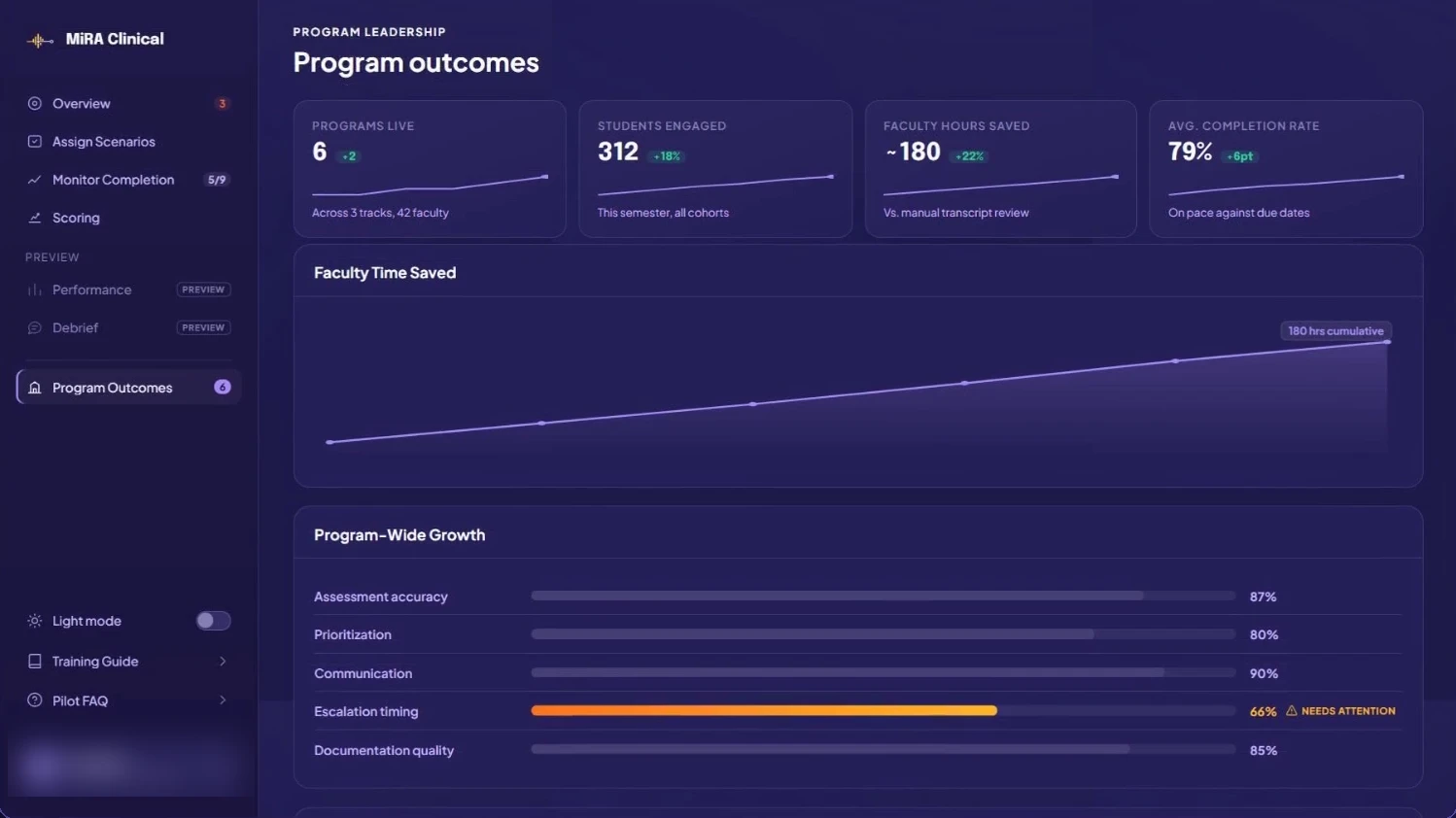
Faculty dashboard Program outcomes view with programs live, students engaged, faculty hours saved and program-wide growth by competency
Program outcomes

Student names are blurred in these screenshots. Performance views are in preview with pilot programs.

The questions faculty ask before every class.

The dashboard is organized around these questions, not around raw logs.

How the nursing simulation rubric scores every encounter.

Every MiRA case ships with a rubric written and reviewed by licensed nurses. It lists the required assessments, the red flags, the expected reasoning and action, when to escalate, the communication expected and the critical errors. It also lists acceptable variations, so a student who takes a different but safe path is not marked down.

During the encounter, MiRA compares what the student says and does against that rubric. If the student drifts, the patient case can give a nudge, a stronger prompt or a critical correction. A student who corrects on their own is not interrupted.

Each objective then receives one of four results:

Met Met with assistance Partially met Not met

A critical safety error, such as giving a drug the patient is allergic to, fails the attempt and triggers remediation and a repeat. Because cases run over several days, scores build longitudinally: you see whether a student who missed a cue on Day 1 caught it on Day 3. See how this maps to the NCSBN clinical judgment model.

MiRA scores every encounter against the rubric. Faculty keep the final grade.
What faculty can do from the dashboard.

Assigning a case takes a patient, a cohort and a due date.

Deploy in clicks

Assign simulation scenarios from the scenario library and launch patient cases across sections with custom due dates.

Track engagement

Track nursing student performance and completion with live progress and time on task, and nudge students who are behind in one click.

Rubric scoring, done for you

Every encounter scored against prebuilt, nurse-written case criteria.

Target remediationPreview

See the cues individuals and the cohort missed, ranked, then adapt lectures and debriefs before exams.

Program trends

Performance across sections and terms. See the full product.

The standards behind every score.

Each objective in a case is tagged to the standards below. Per-case details are in the scenario library.

StandardHow MiRA uses it
NCSBN Clinical Judgment Measurement Model (NGN)The scoring spine. Every objective is tagged to one of the six steps.
INACSL Healthcare Simulation Standards of Best Practice™Every case has defined objectives, a prebrief and debrief points.

CCNE and ACEN are accreditors, not practice standards. MiRA does not claim alignment with them. MiRA results can help programs document outcomes against AACN Essentials.

NCLEX® and Next Generation NCLEX® are registered trademarks of NCSBN. Healthcare Simulation Standards of Best Practice™ is a trademark of INACSL. MiRA Clinical is not affiliated with or endorsed by NCSBN, AACN, or INACSL.

A short note on FERPA.

Student performance data is part of the education record. MiRA is designed to support FERPA-aligned handling: faculty see only their own students, access is role-based, and any screenshot shared outside the program has names removed. We walk through data handling with each school before a pilot begins.

Faculty dashboard questions

What is a nursing faculty simulation dashboard?

It is the faculty side of a simulation program. Instructors assign cases, see who has completed them and review how each student performed against the case rubric. MiRA's dashboard does this for voice-based AI patient encounters, so faculty do not need to watch every session live.

What standards is scoring based on?

Every objective is tagged to a step of the NCSBN Clinical Judgment Measurement Model. Cases are also built with the INACSL Healthcare Simulation Standards of Best Practice™ in mind and mapped to relevant AACN Essentials domains. See the standards crosswalk above.

Does MiRA assign the final grade?

No. MiRA scores every encounter against a nurse-written rubric and shows the transcript behind each result. Faculty review the scores and keep the final grade.

How are students added to the dashboard?

The MiRA team loads your roster. Student names then appear in the dashboard, and faculty assign each student an AI patient. When students sign in to the app, they see only the patients assigned to them.

Can faculty change the rubric?

Each case comes with a nurse-written rubric. Programs can work with our clinical team to adjust objectives so they match course outcomes. Required safety items, such as allergy checks, stay in every version of the rubric.

Can I see what the student actually said?

Yes. Each encounter has a transcript and a timeline of the cues the student caught or missed, so faculty can check a score against the conversation before a debrief.

Does the dashboard work for multiple sections?

Yes. Faculty can filter by section and compare completion and performance across sections and terms.

See the faculty dashboard with your own case.

A 30-minute walkthrough of the student app and the faculty dashboard together.

Request a demo